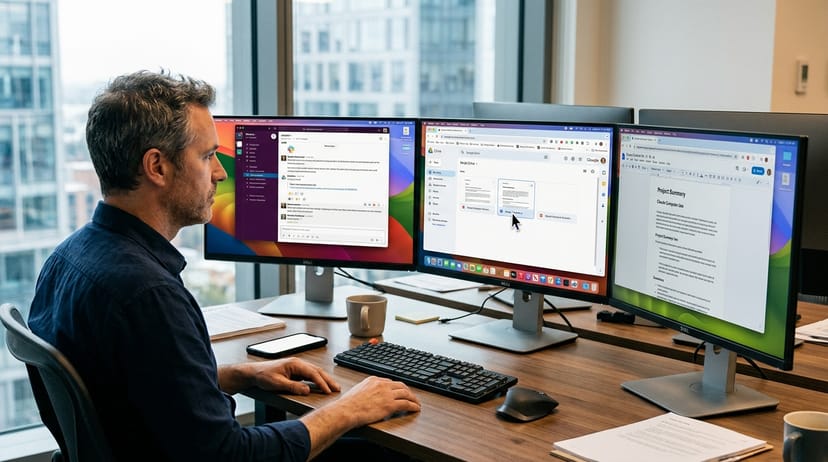
During the recording of an official product demonstration, the unexpected happened: instead of solving a complex programming task as programmed, the artificial intelligence suddenly clicked on the wrong window, aborted the ongoing screen recording, and instead began calmly browsing photos of Yellowstone National Park on the internet. This incident, which the AI company Anthropic candidly shared with the public in October 2024, illustrates the fascinating yet error-prone reality of a completely new technological era. With the "Computer Use" feature for the Claude 3.5 Sonnet model, Anthropic has initiated a paradigm shift: the AI no longer relies on special application programming interfaces (APIs) in the background, but controls the desktop exactly as you would—it looks at the screen, moves the mouse cursor, clicks buttons, and types on a virtual keyboard.
At a glance: With Claude 3.5 Sonnet, Anthropic has released an AI that operates a computer screen visually, just like a human. The "Computer Use" feature enables extensive process automation across all software boundaries, but also brings new IT security risks. For companies, this means a massive leap in efficiency, which, for the time being, requires strict sandbox environments.
AI learns to see and click
Until now, developers had to laboriously adapt their software landscape to artificial intelligence by building custom environments and connectors. "Now we can adapt the model to the tools," Anthropic explains regarding this fundamental strategic shift. Claude integrates into the work environments that people use every day. But how does this work technically on the desktop?
When you give Claude a command, the model continuously analyzes screenshots of your desktop. It literally calculates the pixels from the edges of the screen to navigate the mouse cursor exactly to the desired field. According to the developers, training the model to precisely count pixels was the decisive breakthrough for the technology. Without this ability, the AI would be essentially blind on the desktop and unable to execute targeted mouse clicks.
The results are promising, but also underscore the early development stage of the public beta phase. In the so-called OSWorld benchmark, which evaluates the ability of AI models to operate computers like humans, Claude 3.5 Sonnet achieved a score of 14.9 percent. While this may seem low in direct comparison to human performance, which is usually between 70 and 75 percent, it represents nearly a doubling compared to the previous AI leader, which only reached 7.7 percent.
First practical examples: From code to accounting
Although Anthropic openly communicates that the system can still act sluggishly, well-known companies are already integrating the technology deeply into their operations. Early testers include industry giants such as Asana, Canva, DoorDash, and Replit.
The software company Replit, for example, is using the capabilities of Claude 3.5 Sonnet to develop a key feature for its new "Replit Agent" product. The AI independently navigates through user interfaces and evaluates applications in real-time while they are being programmed. The technology is also being adapted outside of pure software development: the global energy company AES uses Claude via the Google Cloud platform Vertex AI to optimize complex security audits in the energy sector and drastically reduce the time required for these critical tasks.
The corporate vision behind this is compelling: instead of manually executing hundreds of individual steps in spreadsheets, ERP, or CRM systems, you delegate the entire process to the AI agent. If there is no direct API connector to legacy industry software, Claude simply falls back on the visual user interface—just like a human employee.
Security and the limits of autonomy
With this new autonomy, however, security concerns are growing in IT departments. IT experts warn of a significant risk from so-called prompt injections. If the AI surfs the internet autonomously on behalf of the user and reads invisible text on a compromised website, it could be "hijacked" by this malicious code. Since Claude analyzes screenshots of your active window in real-time, sensitive data such as bank details, source code, or customer data could fall into the wrong hands if isolation is inadequate.
Anthropic is aware of these dangers and strongly advises developers and companies to use "Computer Use" for the time being only in strictly isolated sandbox environments such as Docker containers or virtual machines. Furthermore, the company warns that the AI still reaches its limits with everyday, fluid actions such as scrolling, drag-and-drop, or zooming.
For you as a decision-maker, this means: the technology is a powerful, universal tool for the future of process automation. In the present, however, it still requires human oversight and an architecturally well-thought-out, shielded IT security infrastructure.
Frequently Asked Questions
What is "Computer Use" from Anthropic?
"Computer Use" is a feature of the Claude 3.5 Sonnet AI model that allows artificial intelligence to operate a computer like a human. The AI looks at the screen, moves the mouse cursor, clicks buttons, and types text to control software without special interfaces.
How secure is AI desktop control in practice?
Its use currently still carries significant security risks, particularly from so-called prompt injections, where hidden code on websites can manipulate the AI. Experts strongly advise running the feature exclusively in isolated sandbox environments to prevent access to sensitive system data.
What specific tasks can the AI already perform?
Claude can independently fill out forms in the browser, transfer data between different programs, conduct internet research, and test software code. If no API interface is available, the AI simply uses the visual user interface of the respective application.
Sources:
- Introducing computer use, a new Claude 3.5 Sonnet, and Claude 3.5 Haiku – Anthropic, October 2024
- Upgraded Claude 3.5 Sonnet with computer use on Vertex AI – Google Cloud Blog, October 2024
- Anthropic's latest AI model can use a computer just like you – ZDNET, October 2024
- Anthropic Releases New Claude Models and Computer Use Feature – InfoQ, November 2024
- Anthropic's Claude Can Now Use Your Computer to Complete Tasks for You – PCMag, March 2026
Summary
- Claude Computer Use: The Claude 3.5 Sonnet model controls the desktop visually via screenshots and simulates mouse and keyboard inputs without relying on classic APIs.
- Performance: In the OSWorld benchmark, the AI achieves 14.9 percent – a rapid doubling of the previous best value, although still far from human levels.
- Early Adopters: Early users like Canva, DoorDash, and Replit are already using the technology in the beta phase for complex, multi-stage workflows.
- First Step: Evaluate isolated sandbox environments (such as Docker containers) in your company to test AI control safely and without risk to your core systems.